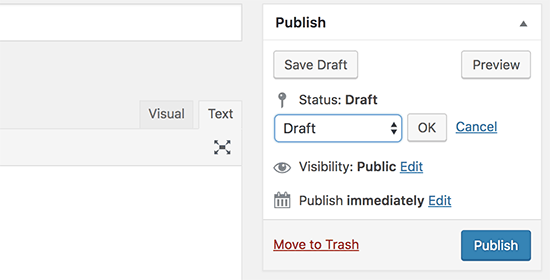
Hey there, WordPress user! If you‘ve ever found yourself scratching your head when it comes to post statuses in WordPress, you‘re not alone. Understanding and effectively utilizing post statuses is crucial for managing your content and maintaining a smooth editorial workflow, especially if you‘re running a multi-author website.
In this comprehensive guide, we‘ll dive deep into the world of WordPress post statuses, providing you with everything you need to know to master this essential feature. From the fundamentals of what post statuses are and why they matter, to advanced tips and best practices for optimizing your content management process, we‘ve got you covered.
What are WordPress Post Statuses?
At its core, a post status in WordPress is an indicator of where a particular piece of content stands within your editorial workflow. It‘s a way to track and manage the progress of your posts, from the initial draft stage to final publication and beyond.
Think of post statuses as a set of labels that you can assign to your content, reflecting its current state and visibility to your website‘s visitors. WordPress comes with a set of default post statuses, each serving a specific purpose in the content management process.
Default WordPress Post Statuses
Draft: A post in the draft status is a work-in-progress that has been saved but not yet published. Drafts are only visible to users with appropriate permissions within the WordPress admin area.
Pending: When a post is marked as pending, it means that it is awaiting review by an editor or administrator before it can be published. This status is particularly useful for multi-author websites with a formal editorial review process.
Scheduled (Previously known as "Future"): A scheduled post is one that has been assigned a future publication date and time. When the scheduled time arrives, WordPress will automatically publish the post.
Published: A published post is live on your website and visible to your visitors. This is the default status for posts that have been reviewed, approved, and are ready for public consumption.
Private: A private post is published but only accessible to logged-in users with the appropriate permissions. It is not visible to regular website visitors.
Trash: When a post is deleted, it is moved to the trash status. Trashed posts can be restored within 30 days before being permanently deleted.
In addition to these default statuses, WordPress also uses "Auto-draft" for posts that are automatically saved while you are working on them, and "Inherit" for attachments and revisions, indicating that they inherit the status of their parent post.
The Importance of Post Statuses in WordPress
Now that you understand the different types of post statuses available in WordPress, let‘s explore why they are so crucial for managing your content effectively.
Enabling Efficient Content Workflows
One of the primary benefits of post statuses is that they allow you to establish a structured, step-by-step workflow for your content creation and publication process. By assigning different statuses to your posts at various stages of development, you can easily track their progress and ensure that nothing falls through the cracks.
For example, let‘s say you‘re managing a multi-author website with a team of writers, editors, and publishers. Here‘s how you might use post statuses to streamline your editorial workflow:
- Writers create new posts and save them as drafts while they are working on them.
- Once a draft is ready for review, the writer changes the status to pending, signaling to the editing team that it is ready for their attention.
- Editors review the pending post, make necessary revisions, and then either send it back to the writer for further changes (by updating the status back to draft) or approve it for publication (by scheduling it for a future date or immediately publishing it).
By following this process and leveraging the appropriate post statuses, your team can collaborate efficiently, ensuring that every piece of content is thoroughly reviewed and polished before it goes live.
Maintaining Content Organization and Visibility
Another key benefit of post statuses is that they help you keep your content organized and easily accessible within the WordPress admin area. By using the filters available in the Posts list, you can quickly view posts by their status, making it simple to find and manage content at different stages of the publishing process.
For instance, you can filter your Posts list to display only draft posts, allowing you to focus on content that still needs work. Similarly, you can view all scheduled posts to get an overview of your upcoming content calendar.
Moreover, post statuses give you control over the visibility of your content to different users and visitors. For example, by setting a post to private, you can restrict access to only logged-in users with the necessary permissions, which is useful for creating content that is exclusive to certain members or user roles.
Advanced Post Status Management with Plugins and Themes
While the default post statuses in WordPress cover most basic content management needs, there may be situations where you require a more granular or customized approach to organizing your editorial workflow. This is where WordPress plugins and themes that support custom post statuses come into play.
Implementing Custom Post Statuses
Custom post statuses allow you to create additional labels beyond the default set provided by WordPress, tailoring your workflow to the unique needs of your website or organization.
For example, a news website might benefit from custom statuses like "In Review," "Fact Check," "Ready to Publish," and "Needs Update" to reflect the various stages of their editorial process more accurately.
To implement custom post statuses, you can use plugins like PublishPress or Edit Flow, which provide intuitive interfaces for creating and managing custom statuses without the need for coding.
Alternatively, if you‘re using a WordPress theme that supports custom post statuses, you may be able to define and configure them through the theme‘s settings or customizer.
Best Practices for Using Custom Post Statuses
When implementing custom post statuses on your WordPress site, consider the following best practices:
Keep it simple: While it‘s tempting to create numerous custom statuses to cover every possible scenario, having too many can lead to confusion and inconsistency. Stick to the minimum number of statuses required to effectively represent your workflow.
Clearly define each status: Ensure that every member of your team understands the meaning and purpose of each custom status. Provide clear guidelines on when and how to use them.
Use descriptive labels: Choose labels for your custom statuses that accurately reflect their function in your workflow. Avoid ambiguous or overlapping terms that could lead to misinterpretation.
Train your team: Provide thorough training to all users who will be working with custom post statuses, ensuring that everyone follows the same processes and conventions.
Post Status Statistics and Usage in WordPress
To give you a better understanding of how post statuses are used in the WordPress community, let‘s take a look at some relevant statistics:
- According to a survey conducted by WordPress.com, approximately 60% of WordPress users have multiple authors contributing to their websites.
- The same survey found that nearly 45% of WordPress sites use custom post statuses to manage their editorial workflows.
- A study by WP Engine revealed that sites with a well-defined content workflow using post statuses have, on average, a 25% higher publication frequency than those without.
These statistics underscore the importance of post statuses in enabling efficient content management and collaboration, particularly for multi-author websites.
Expert Tips for Optimizing Your Post Status Workflow
To help you make the most of post statuses on your WordPress site, here are some expert tips and best practices:
Establish clear communication: Ensure that all team members understand the purpose and usage of each post status, and provide guidelines for when and how to change a post‘s status.
Use drafts liberally: Encourage your writers to save their work as drafts frequently to avoid losing progress and to allow for easy collaboration and review.
Leverage scheduled posts: Utilize the scheduled post status to plan and automate your content publishing, ensuring a consistent flow of new material for your audience.
Regularly review and update statuses: Make it a habit to periodically check the status of your posts and update them as needed to keep your content pipeline organized and on track.
Integrate with other tools: Use post statuses in conjunction with other WordPress features and plugins, such as editorial calendars, to create a comprehensive content management system tailored to your needs.
Conclusion
Post statuses are a powerful tool in the WordPress content management arsenal, enabling you to organize, track, and collaborate on your website‘s content with ease. By understanding the different types of post statuses available and how they can be used to streamline your editorial workflow, you‘ll be well-equipped to keep your content pipeline running smoothly and efficiently.
Remember, whether you‘re running a solo blog or a multi-author website, post statuses are an essential component of your content strategy. By following the best practices and expert tips outlined in this guide, you‘ll be able to optimize your post status workflow and take your content management game to the next level.
So go ahead and put these insights into practice, and watch as your WordPress site flourishes with well-organized, efficiently managed content. Happy posting!
