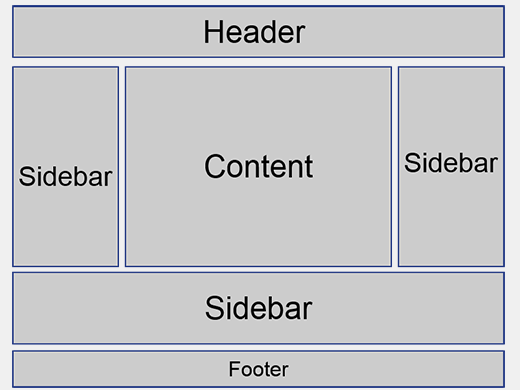
Hey there, WordPress user! If you‘re looking to take your website to the next level, understanding how to effectively use sidebars is essential. As a core feature in nearly every WordPress theme, sidebars provide ample opportunities to enhance your site‘s user experience, engage visitors, and drive conversions.
In this in-depth guide, we‘ll dive into everything you need to know about WordPress sidebars. From the technical basics to real-world examples and best practices, you‘ll learn how to transform your theme‘s sidebars from an afterthought into a powerful tool for your website‘s success.
What Exactly Is a Sidebar in WordPress?
In WordPress theme development, a sidebar is a defined area outside of the main content area that contains widgets. Sidebars are typically used to display complementary content, navigation elements, or interactive features that enhance the user experience.
Despite the name, sidebars don‘t always appear on the side of a page. Depending on the theme, sidebars can be placed in various locations, such as:
- A vertical column on the left or right side of the main content
- Horizontal sections above or below the main content area
- In the header or footer area of a page
- On specific pages or sections of a website

Technically speaking, sidebars are defined in a theme‘s template files using a combination of WordPress template tags and HTML markup. The most common template tag for registering a sidebar is register_sidebar(), which is typically called in the functions.php file.
Here‘s a simplified example of how a theme might register a primary sidebar:
function mytheme_widgets_init() {
    register_sidebar( array(
        ‘name‘          => __( ‘Primary Sidebar‘, ‘mytheme‘ ),
        ‘id‘            => ‘sidebar-1‘,
        ‘description‘   => __( ‘Widgets in this area will be displayed in the sidebar.‘, ‘mytheme‘ ),
        ‘before_widget‘ => ‘<div id="%1$s" class="widget %2$s">‘,
        ‘after_widget‘  => ‘</div>‘,
        ‘before_title‘  => ‘<h3 class="widget-title">‘,
        ‘after_title‘   => ‘</h3>‘,
    ) );
}
add_action( ‘widgets_init‘, ‘mytheme_widgets_init‘ );
Once registered, the sidebar becomes a "widget area" that users can add, remove, and rearrange widgets in using WordPress‘s built-in Widgets screen.

This combination of sidebar registration in the theme files and widget management in the WordPress Admin area gives website owners a great deal of flexibility and control over their sidebar content.
Why Sidebars Matter: Key Benefits and Opportunities
So why should you care about optimizing your WordPress sidebars? When used strategically, sidebars can provide several key benefits to your website and its users:
Improved navigation and user experience
By highlighting important pages, categories, or resources in your sidebar, you make it easier for visitors to explore your site and find the content they‘re looking for. This can lead to increased pageviews, longer visit durations, and lower bounce rates.Enhanced content discoverability
Sidebars provide an opportunity to showcase your most popular, recent, or relevant content, encouraging visitors to engage with more of your site. By surfacing content that users might have otherwise missed, sidebars can drive more traffic to your key pages and posts.Increased conversions and revenue
Effective sidebar design can have a direct impact on your website‘s conversion rates and profitability. By strategically placing calls-to-action, opt-in forms, or promotional offers in your sidebars, you can guide visitors towards taking desired actions, such as joining your email list, making a purchase, or contacting your business.Space for additional functionality
Sidebars provide valuable real estate for adding functional widgets and tools to your site, such as search bars, social media feeds, or email signup forms. By adding these elements to your sidebars, you can enhance your site‘s capabilities without cluttering your main content area.
Real-World Examples and Use Cases
To illustrate the power and versatility of WordPress sidebars, let‘s look at a few examples of websites across different industries that are using sidebars effectively.
Example 1: Blog Sidebar

In this example from a popular cooking blog, the sidebar includes:
- An email opt-in form to build the site‘s subscriber list
- Links to popular recipe categories for easy navigation
- A search bar to help visitors find specific recipes
- Thumbnail links to featured or seasonal recipes
- Affiliate banner ads to generate revenue
This combination of elements helps guide visitors to the most relevant content, encourages email signups, and monetizes the site through ads, all without detracting from the main recipe content.
Example 2: Ecommerce Sidebar

For this online store selling outdoor gear, the sidebar is optimized for driving sales and conversions:
- Product category links help shoppers quickly navigate to relevant items
- Promotional banners highlight current sales and discounts
- A customer testimonial builds social proof and trust
- An email signup form offers a discount code incentive
- Links to top-selling products drive traffic to high-converting pages
By focusing on navigation, promotions, and trust-building elements, this ecommerce sidebar is designed to guide visitors towards making a purchase.
Example 3: Local Business Sidebar

In this example of a sidebar for a local service business website, the key elements include:
- A prominent "Request a Quote" call-to-action button
- Customer review snippets and trust badges to build credibility
- An embedded Google Maps widget showing the business‘s location
- Links to key service pages for easy navigation
- Accreditation badges and professional association memberships
This sidebar‘s content is geared towards encouraging potential customers to contact the business, building trust, and highlighting the most relevant information and pages.
Sidebar Best Practices and Optimization Tips
Now that you‘ve seen some examples of effective sidebar use in action, let‘s dive into some best practices and tips for optimizing your own WordPress sidebars.
1. Prioritize above-the-fold content
Place your most important sidebar elements, such as opt-in forms or key navigation links, towards the top of the sidebar where they‘re more likely to be seen. Studies have shown that content above the fold receives significantly more attention than content requiring scrolling.
2. Keep it concise and focused
Sidebars have limited space, so it‘s important to be selective about what you include. Stick to the most essential, relevant, and compelling elements, and avoid cluttering your sidebar with too many widgets or long blocks of text.
3. Optimize for mobile responsiveness
With mobile devices accounting for over 50% of web traffic, it‘s crucial that your sidebars are optimized for smaller screens. Make sure your theme‘s sidebar styling is responsive and that key elements are easily accessible on mobile.

4. Use eye-catching visuals
Incorporating images, graphics, or icons into your sidebar elements can help draw users‘ attention and make your sidebar content more engaging. Just be sure to use visuals that are relevant, high-quality, and optimized for fast loading times.
5. Leverage whitespace and separation
Avoid overcrowding your sidebar by using ample whitespace and clear visual separation between different sections or widgets. This improves readability and makes it easier for users to quickly scan and find what they‘re looking for.
Using conditional tags or widget visibility controls, you can display different sidebar content on specific pages or sections of your site. This allows you to tailor your sidebar to the specific context and goals of each page, providing a more relevant and targeted user experience.
7. Conduct A/B tests and optimize based on data
As with any aspect of your website, it‘s important to base your sidebar optimization decisions on real data and user feedback. Use A/B testing tools like Google Optimize to experiment with different sidebar variations and track key metrics like click-through rates, conversions, and bounce rates to continuously improve your sidebar‘s performance over time.
The Bottom Line: Your Sidebar Strategy Matters
Sidebars may seem like a small part of your overall WordPress website, but they can have a big impact on your site‘s user experience, engagement, and conversions.
By understanding the technical basics of how WordPress sidebars work, exploring real-world examples and best practices, and continuously testing and optimizing your sidebar content, you can transform this often-overlooked area of your site into a valuable asset for your business and your users.
So don‘t let your WordPress theme‘s sidebars be an afterthought – start putting these strategies and tips into action, and see the difference effective sidebar optimization can make for your website‘s success.
