Are you looking to create a custom homepage for your WordPress site? One that welcomes visitors with engaging content and guides them to your most important pages? Then you need to harness the power of static front pages.
In this ultimate guide, we‘ll dive deep into static front pages in WordPress. You‘ll learn exactly what they are, why they matter, and how to use them effectively on your site. By the end of this post, you‘ll be able to confidently create a compelling front page that captivates your audience and drives results for your business.
What is a Static Front Page in WordPress?
Let‘s start with a technical definition. A static front page in WordPress is a specific page that you designate to appear as your site‘s homepage, instead of displaying your latest blog posts. Essentially, you‘re telling WordPress to use a static, unchanging page as your front page rather than a dynamic list of recent posts.
Under the hood, a static front page is just a regular WordPress page that you‘ve selected to display as your homepage. The content on this page remains static or fixed unless you specifically edit the page itself. That‘s why it‘s called a "static" page.
Normally, WordPress shows your most recent blog posts on the homepage. But by using a static front page, you can customize the first page people see when they land on your site. This gives you much more control over the design, layout, and content of your homepage.
Here‘s what WordPress developer Reed Floren says about static front pages:
A static front page allows you to curate the exact experience you want visitors to have when they first encounter your site. Instead of a list of your latest posts, you can create a unique layout with a clear call-to-action, engaging visuals, and your most compelling content. It‘s a powerful tool for creating a strong first impression.
Why Use a Static Front Page?
So why would you want to use a static front page instead of just displaying your blog posts? Here are a few key reasons:
You want your homepage to be an introduction to your brand, not a feed of your latest updates. A static front page allows you to craft a purposeful, engaging experience that communicates who you are and what you offer.
You want to guide visitors to specific pages or actions, like signing up for your email list or browsing your products. With a static front page, you can include prominent calls-to-action and links to direct traffic exactly where you want it to go.
You want your homepage to have a unique design that doesn‘t look like a generic blog. By using a static page, you can customize the layout and style to match your brand and create a truly memorable experience.
You don‘t update your blog very frequently, so displaying recent posts on the homepage won‘t be very effective. A static page ensures that your homepage always has fresh, relevant content even if you‘re not posting regularly.
According to a study by web design firm Orbit Media, 86% of WordPress sites now use a static front page. It‘s become a web design best practice for all types of sites, not just blogs.
How to Create a Static Front Page in WordPress
Convinced that a static front page is right for your WordPress site? Great! Here‘s how to set one up, step-by-step:
Create a new page to use as your static front page. Give this page a descriptive title like "Home" or "Welcome." You can leave the content blank for now.
Optionally, create another page to use as your blog page. This is where WordPress will display your recent blog posts, now that they won‘t appear on the homepage. Title it something like "Blog" or "News."
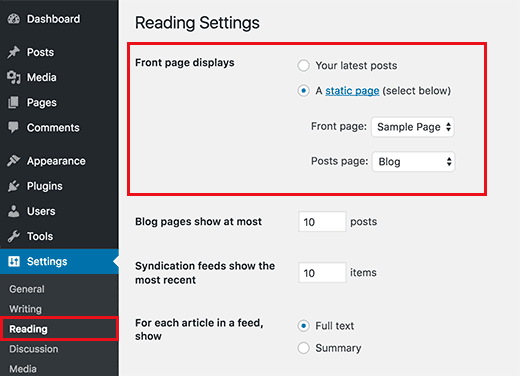
Go to Settings > Reading in your WordPress dashboard. Look for the "Your homepage displays" setting.
Select the "A static page" option and choose the pages you created in steps 1 and 2 from the drop-down menus. This tells WordPress to use your new pages as the homepage and blog page.
Click the "Save Changes" button to make your new static front page live.
That‘s it! Your WordPress site now has a static front page. Of course, you‘ll still need to add content and customize the design to make it your own. Refer back to the previous section for tips and best practices.
Static Front Page Examples and Inspiration
Need some real-world examples of effective static front pages? Here are a few of our favorites:
Airbnb: Airbnb‘s homepage instantly communicates the brand promise and value proposition. Visitors can search for rentals right from the homepage, or click to learn more about hosting or experiences. The design is clean, modern, and visually engaging.
Asana: Project management tool Asana uses its homepage to showcase the product‘s key features and benefits. Animations and interactive elements make the page feel dynamic and engaging. Clear CTAs encourage visitors to sign up for a free trial.
Zendesk: Zendesk‘s homepage combines bold typography, colorful illustrations, and concise copy to communicate the brand‘s personality and positioning. The page is divided into clear sections for different types of visitors, like enterprises, startups, and support teams.
charity: water: This non-profit‘s homepage tells a powerful story about the organization‘s mission and impact. Vivid images, videos, and statistics make the case for donating. The design is clean and focused, with a prominent donation CTA.
Best Practices for Static Front Pages
To make your static front page as effective as possible, follow these tips and best practices:
1. Clarify your primary goal
Every static front page should have a clear, focused goal. Are you trying to get visitors to sign up for your service? Purchase a product? Subscribe to your newsletter? Donate to your cause? Whatever it is, make sure every element on the page works towards that primary goal.
2. Put your value proposition front and center
As soon as visitors land on your static front page, they should understand what your site is about and why it matters to them. Your headline, subheadings, and primary copy need to communicate your unique value proposition in a clear, concise way. Focus on benefits, not just features.
Social proof is a powerful psychological principle that says we‘re more likely to take an action if we see that others are doing it too. You can leverage social proof on your static front page by displaying customer logos, testimonials, trust badges, or statistics that demonstrate your popularity and credibility.
4. Include prominent CTAs
If you want visitors to take a specific action, you need to ask them to do it! Include clear, prominent calls-to-action (CTAs) on your static front page that tell visitors exactly what to do next. Use action-oriented language and make your CTAs stand out with contrasting colors and plenty of whitespace.
5. Make it visual
Don‘t just rely on text to get your message across. Incorporate compelling visuals like high-quality images, videos, illustrations, and infographics to make your static front page more engaging and memorable. Visuals can help you communicate complex ideas quickly and effectively.
6. Optimize for mobile
In 2026, having a mobile-friendly website is non-negotiable. Make sure your static front page looks and functions beautifully on screens of all sizes, from desktops to smartphones. Use responsive design techniques and test thoroughly on real devices.
7. Keep it fresh
Just because your front page is "static" doesn‘t mean it has to stay the same forever. Make a habit of periodically reviewing and refreshing your static front page to ensure the content and design are still relevant and effective. Don‘t be afraid to experiment with new copy, visuals, or layouts to see what works best.
Tools for Creating Static Front Pages
To create a truly custom static front page, you‘ll probably need more than just the WordPress editor. Here are a few tools and plugins that can help:
Page builders: Page builder plugins like Elementor, Divi, and Beaver Builder make it easy to create custom page layouts without coding. With drag-and-drop interfaces and pre-built templates, you can design your perfect front page in minutes.
Landing page plugins: Landing page plugins are specifically designed for creating high-converting pages like static front pages. Options like Leadpages, Unbounce, and Instapage offer robust features for design, A/B testing, and integration with email marketing and CRM platforms.
Header/footer plugins: Most WordPress themes only let you customize your front page content, not the header and footer. Plugins like Header Footer Elementor and Beaver Themer give you full control over your entire front page layout, top to bottom.
Custom CSS: If you‘re comfortable with code, you can use custom CSS to tweak your static front page design to perfection. The Additional CSS panel in the WordPress Customizer makes it easy to add your own styles without editing your theme files directly.
Static Front Page Statistics
Still not convinced that static front pages are the way to go? Check out these eye-opening statistics:
- 86% of WordPress sites use a static front page (Orbit Media)
- Websites with a clear value proposition on the homepage are 27% more likely to convert visitors into leads (Marketing Experiments)
- Long-form homepage copy (800+ words) generates 30% more leads than short-form copy (Marketing Experiments)
- 90% of visitors who read your headline also read your CTA copy (Unbounce)
- Featuring a video on your homepage can increase conversions by 20-80% (Unbounce)
Frequently Asked Questions
Can I have a static front page and a blog on the same site?
Absolutely! WordPress makes it easy to have both a static front page for your main website content and a separate blog section for your latest posts. Just create a page for your blog posts to live on, and select it as your "Posts page" in the Reading settings.
Will a static front page hurt my SEO?
Nope! Having a static front page won‘t directly impact your WordPress site‘s SEO. In fact, a well-optimized static front page with keyword-rich headings and content can actually help your site rank higher in search results. Just make sure to include your blog posts in your sitemap so search engines can easily find and index them.
How often should I update my static front page?
There‘s no hard and fast rule for how often you need to update your static front page. It ultimately depends on your industry, audience, and goals. At a minimum, we recommend reviewing your front page content and design every 3-6 months to ensure it‘s still accurate and effective. If you‘re running a major promotion or launching a new product, you may want to update more frequently.
Can I use a static front page with any WordPress theme?
Most WordPress themes support static front pages out of the box. As long as the theme follows WordPress coding standards, you should be able to select a static front page in the Reading settings. That said, some themes are better suited for static front pages than others. Look for themes that include a variety of page templates and customization options.
Conclusion
Creating a compelling static front page is one of the best ways to make a strong first impression on your WordPress site‘s visitors. By crafting a unique, focused design with clear messaging and calls-to-action, you can turn casual browsers into devoted customers and loyal fans.
Use the tips and best practices in this guide to build a static front page that engages and converts. And remember, your front page isn‘t set in stone! Don‘t be afraid to experiment and iterate until you find the perfect formula for your site.
With a little creativity and strategic thinking, your static front page can become one of your most powerful tools for growing your online presence. So what are you waiting for? Get out there and start building the front page of your dreams!
)