Hey there, WordPress wizard! 🧙♂️ Are you ready to take your website to the next level with an AI-powered chatbot? You‘ve come to the right place. In this ultimate guide, we‘ll walk you through exactly how to add a chatbot to your WordPress site in 2026, step-by-step.
But first, let‘s talk about why you should care about chatbots in the first place. Did you know that:
- 🤖 80% of businesses plan to deploy chatbots by 2026 (Business Insider)
- 💬 Chatbots can handle up to 80% of routine customer queries (IBM)
- 📈 Implementing a chatbot can increase conversions by up to 25% (Outgrow)
The bottom line is, chatbots are no longer a nice-to-have – they‘re a must-have for any business that wants to stay competitive and deliver top-notch customer experiences at scale.
So, how do you actually add a chatbot to your WordPress site? We‘ll cover three methods:
- 🦸♂️ Adding a support chatbot with Heroic KB
- 🛍️ Creating a sales chatbot with Chatbot.com
- 🤖 Implementing an AI-powered chatbot with HubSpot
Let‘s dive in!
Method 1: Add a Support Chatbot with Heroic KB
Heroic KB is a powerful WordPress knowledge base plugin that comes with a built-in AI chatbot. The chatbot can be trained on your knowledge base content, allowing it to automatically answer common customer questions. Here‘s how to set it up:
Install and activate the Heroic KB plugin. You‘ll need a Pro license to access the AI chatbot.
In your WordPress dashboard, go to Heroic KB > Settings > Help Assistant. Enable the AI Help Assistant and configure the settings to your liking.
Next, go to the AI Help Assistant tab and enter your OpenAI API key. This is required for the chatbot to function. You can get an API key from OpenAI.
Now it‘s time to train your chatbot. In the AI Help Assistant tab, click "Train on this site‘s Heroic Knowledge Base". The chatbot will read through your knowledge base content and learn to answer questions based on it.
Once the training is complete, test your chatbot by asking it some common customer questions. If it provides relevant answers from your knowledge base, you‘re good to go!
Here‘s what the Heroic KB chatbot looks like in action:
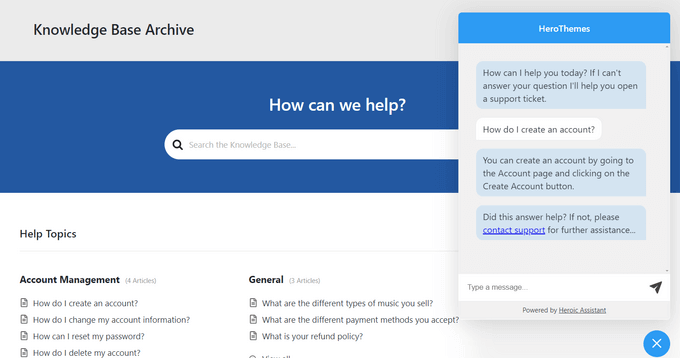
That‘s all there is to it! With Heroic KB, you can have a powerful support chatbot up and running on your WordPress site in just a few clicks.
Method 2: Create a Sales Chatbot with Chatbot.com
Want to use a chatbot to drive more leads and sales? Chatbot.com is an excellent solution. It‘s a full-featured chatbot platform that integrates seamlessly with WordPress. Here‘s how to use it:
Sign up for a Chatbot.com account and install the official WordPress plugin.
In your Chatbot.com dashboard, create a new chatbot. You can use a pre-built template or start from scratch. For this example, let‘s use the "Lead Generation" template.
Customize your chatbot‘s conversation flow using the visual builder. You can add questions to qualify leads, offer personalized product recommendations, and more. Chatbot.com offers a wide range of integrations to connect with your CRM, email marketing tool, and other systems.
Once you‘re happy with your chatbot, toggle it live on your WordPress site. You can choose to display it on specific pages or sitewide.
Here‘s an example of what a Chatbot.com sales chatbot might look like:

- Monitor your chatbot analytics to track key metrics like engagement rate, lead capture rate, and sales influenced. Optimize your chatbot over time to maximize results.
According to Chatbot.com, companies using their platform have seen results like:
- 🚀 50% increase in lead volume
- ⏱️ 3X faster response times
- 💰 25% increase in sales conversion rates
By leveraging a sales-focused chatbot on your WordPress site, you can engage more prospects, provide instant answers to their questions, and ultimately drive more revenue.
Method 3: Implement an AI-Powered Chatbot with HubSpot
Want to harness the power of cutting-edge AI for your chatbot? Look no further than HubSpot‘s Chatbot Builder. Powered by machine learning, HubSpot‘s chatbots can understand natural language, personalize their responses, and even handle complex queries. Plus, they integrate natively with the rest of HubSpot‘s marketing, sales, and service tools.
Here‘s how to add a HubSpot chatbot to WordPress:
Sign up for a HubSpot account and install the HubSpot WordPress plugin.
In your HubSpot dashboard, navigate to Conversations > Chatflows. Click "Create chatflow".
Choose from a range of pre-built templates for different use cases, like booking meetings, providing customer support, and qualifying leads. For this example, let‘s use the "Support" template.
Customize your chatbot‘s flow using the visual editor. You can add questions, branching logic, and integrations with your knowledge base and ticketing system. The chatbot can also hand off to a live agent when needed.
Publish your chatbot and choose where it should appear on your WordPress site. You can also set up targeting rules to show the chatbot to specific user segments.
Here‘s what a support conversation with a HubSpot chatbot might look like:

According to HubSpot, their chatbots have helped companies achieve results like:
- 🎟️ 40% decrease in support ticket volume
- ⌚ 2X faster time to resolution
- 😊 10% improvement in customer satisfaction scores
By leveraging the power of conversational AI, you can provide smarter, more human support experiences at scale – without overburdening your team.
Advanced Chatbot Strategies for 2026 & Beyond
Having a chatbot is a great start – but to really get the most value, you need to optimize your chatbot strategy over time. Here are a few advanced tips:
Focus on High-Impact Use Cases
Don‘t try to do everything with your chatbot at once. Hone in on the use cases that will have the greatest impact on your business, like:
- 🧑💻 Providing 24/7 customer support
- 🔍 Answering common pre-sales questions
- 📅 Scheduling demos and meetings
- 🛒 Offering personalized product recommendations
By focusing your efforts, you can deliver maximum value to your customers and your bottom line.
Leverage Conversational Analytics
Chatbot conversations are a goldmine of customer insights. By analyzing chatbot transcripts, you can:
- 💡 Identify common customer pain points and FAQs
- 📊 Track key metrics like goal completion rate and sentiment
- 🔄 Optimize your chatbot flows based on user behavior
Tools like Dashbot and Botanalytics can help you derive actionable insights from your chatbot data.
Experiment with Voice Interfaces
While most chatbots today are text-based, voice assistants like Alexa and Google Assistant are on the rise. In fact, 41% of adults use voice search daily (PWC).
Consider experimenting with voice-based chatbots to provide an even more natural, hands-free experience for your customers. Tools like Jovo and BotTalk make it easy to build voice chatbots for multiple platforms.
Prepare for the Age of AI
As AI continues to advance at a breakneck pace, chatbots are becoming increasingly intelligent and human-like. With the rise of large language models like GPT-4, chatbots will soon be able to engage in truly open-ended conversation while drawing upon vast knowledge bases.
To stay ahead of the curve, start exploring AI-powered chatbot solutions like Boost.ai and MobileMonkey. By harnessing the power of AI, you‘ll be able to provide even more personalized, efficient, and delightful chatbot experiences.
Chatbots are the Future of Customer Experience
In 2026 and beyond, chatbots will only become more ubiquitous and sophisticated. As customers grow to expect instant, personalized support on their terms, chatbots will become a must-have for businesses of all sizes.
By implementing a chatbot on your WordPress site today, you can:
- ⏰ Provide 24/7 customer support
- 💰 Generate more leads and revenue
- 😊 Improve customer satisfaction and loyalty
- 🧠 Gain valuable insights into customer needs and behavior
Whether you choose to build a support chatbot with Heroic KB, a sales chatbot with Chatbot.com, or an AI-powered chatbot with HubSpot, the important thing is to get started and iterate over time.
With the strategies and tools covered in this guide, you have everything you need to create a chatbot that drives real results for your WordPress site. So what are you waiting for? Go forth and bot! 🤖
Still have questions about adding a chatbot to your WordPress site? Let me know in the comments below! 👇
)