

If you upload images to a website and hope Google, users, and screen readers u201cjust understand,u201d you are underusing one of the cheapest growth levers you already have. Real-world image work is not just decoration. It is metadata, delivery, accessibility, and trust shaping. In practical terms: one image can fail conversion, damage crawl quality, and hurt brand perception if its text, format, and loading strategy are not intentionally set.
That is why this guide is focused on implementation, not theory: how to build a production-ready image workflow with real user needs in mind, and why a fast image description assistant like imagedescriber.com can help but should never replace human review.
Start from image purpose, not from style
People treat images as u201cmake it look goodu201d objects. For a real page, the first question is business purpose:
- Trust: Does the image prove authenticity (e.g., screenshots, receipts, before/after examples)?
- Action: Is there a call-to-action inside or around the image block?
- Search: Is it discoverable through alt text, filename, and context?
- Usability: Does it help users make decisions faster?
When purpose is unclear, any optimization becomes arbitrary. Start by labeling each image with a specific intent and an owner. That avoids a class of failures where one team creates beauty while another assumes search relevance.
Use real alt text, not generic fallback lines
Many teams still publish dozens of images with the same generic text: u201cimageu201d or u201cphoto.u201d That can satisfy minimum technical checks but does not satisfy user intent. Alt text is not decoration; it is a data field for people who do not see the image. It also improves how assistive contexts and some extractive indexing systems interpret content.
W3C WAI image tutorial explains the core rule: meaningful content should be represented in alt attributes, decorative images should be explicitly skipped, and complex visuals may need nearby context. Operationally:
- Lead with what the user should know in one sentence.
- Do not dump full marketing copy in alt text.
- Mark purely decorative assets as empty alt text when they do not convey meaning.
For example, an image that contains pricing and a promo code needs full actionable alt text. A background texture does not.
The AI image-description step: use it as a first draft only
imagedescriber.com is useful for speed in two places:
- Generating a first-pass description from image content.
- Identifying likely missing context in existing bulk libraries.
But users rarely need raw AI descriptions verbatim. You still need final human pass for intent:
- Accuracy: AI can miss brand names, model numbers, or pricing shown visually.
- Tone: Internal consistency across product categories requires stable language.
- Action mapping: If the image is tied to an offer, alt should mention that action.
Think of AI description as a parser that gives you a near-draft, while your product owner validates meaning before publish.
Image metadata triage for real teams
Before upload, run every asset through a simple triage checklist:
| Item | Good state | Failure state |
|---|---|---|
| Filename | Descriptive keyworded slug, concise | random UUID without semantic context |
| Alt text | Meaningful, concise, action-aware | u201cimage,u201d u201cphoto,u201d or repeated duplicates |
| Caption | Supports surrounding content | Overwrites or contradicts alt text |
| Dimensions | Matches CSS container or responsive expectations | Huge originals scaled via browser only |
| Format | Appropriate for quality + size tradeoff | Largest format for every use case |
Doing this before upload reduces 80% of common image support tickets: missing alt, oversized files, and unclear context.
Why width/height and aspect ratio still matter in 2026
Modern frameworks can auto-size and lazy-load, but responsive behavior still fails when intrinsic dimensions are absent. Missing dimensions trigger layout shifts and poor UX. Even if your theme is modern, unknown dimensions are a classic performance regression source.
The fix is not guesswork: define the display intent first, then store an image variant matching that intent. If a hero needs 16:9 on desktop but 4:5 on mobile, either prepare both or ensure CSS controls avoid excessive scaling artifacts.
Operationally, this saves cumulative layout shifts and helps conversions on image-driven landing pages where visual jumpiness kills trust quickly.
When to use AI descriptors in CMS bulk workflows
Bulk imports and legacy libraries often have thousands of uncurated images. In that case, an AI batch step is justified. You can do:
- Run description generation in batch.
- Apply rule-based filters: remove duplicates, too-short outputs, or confidence warnings.
- Route remaining items to human review for sensitive categories.
Safe categories for auto-pass include diagrams and non-sensitive utility visuals. Sensitive categories include people photos, legal documents, and product screenshots with text labels that can affect business claims.
This keeps speed and reliability balanced: the machine does broad generation, humans handle risk.
Technical image quality checkpoints
Beyond alt text, there are three engineering checks most teams skip until launch:
1) Crawlability context
Images should carry context in surrounding copy and labels. Search indexers do not rely on the image alone. Keep meaningful wording near the image block and link to an anchorable content block when the image explains a workflow.
2) Semantic HTML
Use the correct semantic element for the role. For plain content, use <figure> and <figcaption> patterns where useful. For form or dashboard screenshots, include adjacent textual context because visual-only evidence can be ambiguous in non-visual contexts.
MDN image element documentation is practical here because it defines baseline attributes and behavior clearly. In practice, stable attributes prevent edge failures when templates migrate.
3) Accessibility review
Run at least one manual keyboard test and one screen reader expectation test. If an essential image is skipped because it is decorative by mistake, users lose signal. If an image contains information but no alternative text, users lose understanding.
A simple team rule: every image with business meaning must have either informative alt, equivalent nearby text, or both.
Common production mistakes and fixes
Mistake 1: Reusing images across contexts with unchanged alt text.
Fix: alt text should reflect local context. u201cProduct close-upu201d is not enough when one page sells speed and another sells durability.
Mistake 2: Copying AI-generated descriptions without verification.
Fix: verify labels, quantities, and pricing words manually for critical assets.
Mistake 3: Using one huge JPEG for all breakpoints.
Fix: keep purpose-built assets for key breakpoints and formats.
Mistake 4: Ignoring filename quality.
Fix: filenames should describe primary subject and page context instead of timestamp strings.
Image pipeline that scales for teams
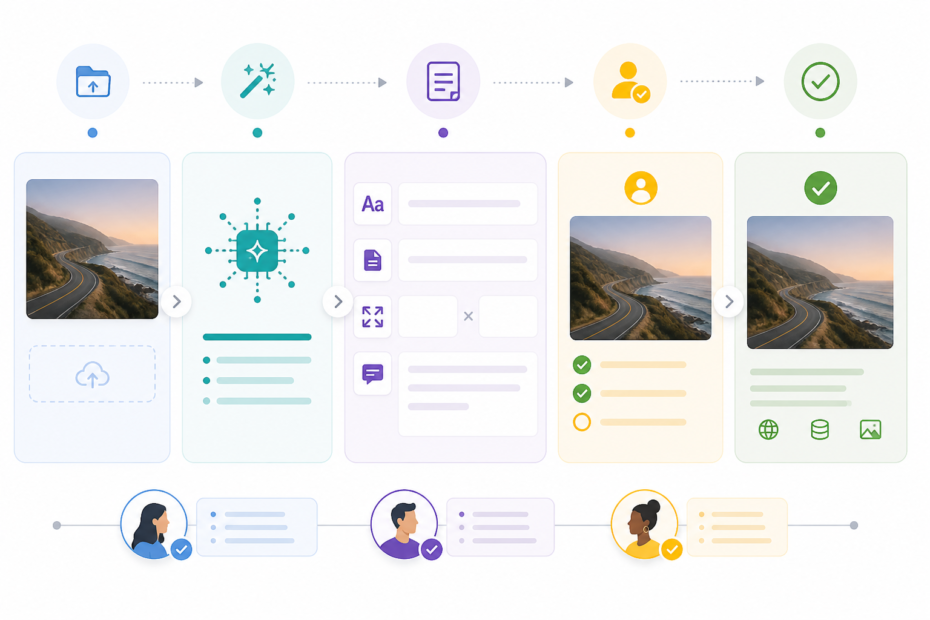
A practical pipeline that works across small and fast-moving teams:
- Ingestion: collect source from designers or tools.
- AI assist pass: generate draft alt + caption from service like imagedescriber.
- Editorial check: verify business correctness and tone.
- Technical pass: set dimensions, file size, and lazy-load behavior.
- Publish: upload and validate on real pages.
- Post-publish checks: verify rendering and text extraction behavior.
With this sequence, teams reduce rework in CMS because errors are caught earlier and with clearer ownership.
What to do before any high-volume image publish
Before publishing a major image set, run a small governance test:
- Pick 10 random pages with image-heavy blocks.
- Validate that each important image has meaningful alt text.
- Measure rendering on slow network and at 320px width.
- Validate one page in a screen reader flow for image comprehension.
If all pass, you can scale. If not, pause and fix shared patterns before additional uploads.
Launch-ready image governance checklist
When teams scale, quality only stays stable if checks are run as a release gate, not a one-time cleanup. A practical checklist for image-heavy releases is:
- Verify
featured_image_urlexists in the publishing payload and map it to a deterministic alt label. - Confirm every meaningful image has explicit alt text and a sensible caption path.
- Check intrinsic dimensions against intended containers and confirm lazy-load behavior is intentional.
- Validate that decorative images are either
alt=""or not included in assistive-critical content regions. - Run an end-to-end path on the live page for image visibility, article body presence, and thumbnail rendering.
- Document any exception to keep regressions explainable after publish.
For each blocked item, assign one owner and a fix date. A page with two unresolved image issues is usually worse for trust than a page with one unresolved non-image issue because users interpret broken imagery as broader site quality debt.
Recovery playbook when image issues appear after publishing
If a publish passes backend checks but the visible page still has image quality issues, do not assume the problem is cache alone. Use a staged recovery:
- Step 1: Compare backend thumbnail fields and synthetic payload fields from Locoy response.
- Step 2: Inspect WordPress media metadata and fake attachment flags for the saved featured image.
- Step 3: Verify theme visibility markers like
has-post-thumbnailand image block output. - Step 4: If FIFU metadata exists but thumbnail is missing, apply the repair routine for featured-image metadata sync.
- Step 5: After repair, clear cache and run a second browser check against the clean permalink.
Teams that apply this playbook within 24 hours avoid long tail issues where old image expectations spread into support workflows and user screenshots continue to reference broken states.
Image strategy for user trust and conversion
From a user perspective, u201cimage qualityu201d is not only resolution. It is meaningfulness and consistency. If your images consistently align with content headings, readers trust the page faster. If they do not, users question authenticity even when the design looks polished.
That is where practical image descriptions and metadata become a conversion control, not just an SEO tool.
Bottom line
If you want images that actually help users, combine AI assistance with production safeguards. Use imagedescriber.com to speed up first-pass descriptions, then enforce human review and technical controls: alt text correctness, semantic HTML, dimensions, and accessibility coverage.
That workflow is simple, repeatable, and measurable. It turns u201cupload and hopeu201d into u201cupload with intent.u201d
