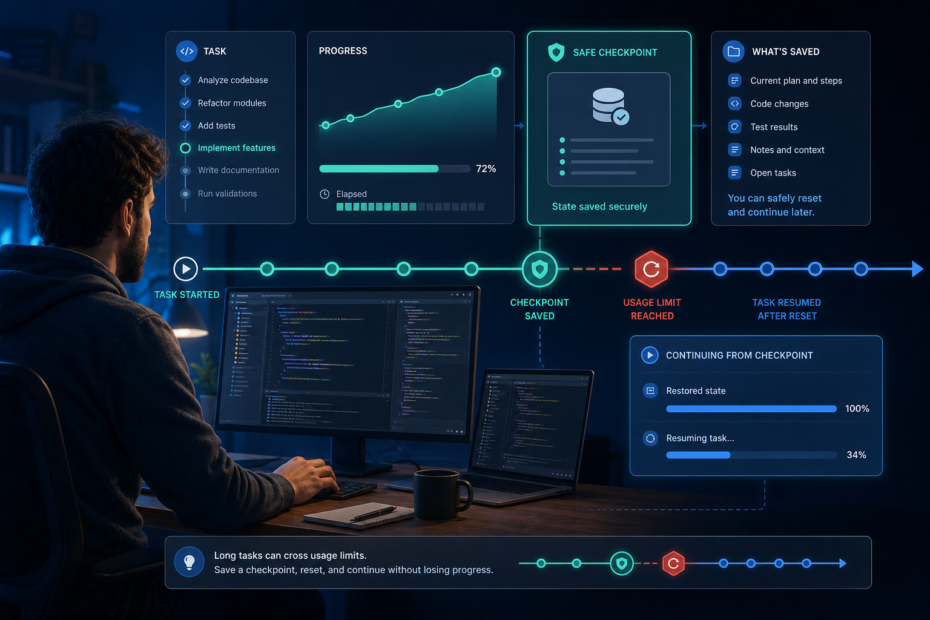

A long Codex task should never depend on one uninterrupted usage window. The practical fix is to make the task recoverable before the limit becomes urgent: check the account-side usage signal, divide the work into verifiable milestones, and keep a short checkpoint that tells the next session exactly what is finished, what remains uncertain, and what action is safe to take next.
This matters because Codex usage is not a simple message counter. OpenAI’s official Codex usage guidance says consumption varies with the size and complexity of the work, the model, where the task runs, and the amount of context involved. A small edit and a repository-wide migration therefore do not create the same risk, even if both begin with one prompt.
The goal is not to predict the exact moment a task will stop. It is to ensure that reaching a limit changes the schedule, not the integrity of the work.
The direct answer: build a restart point before you need one
Before starting a long task, create a small recovery record inside the project or in a task note. It should capture seven things: the objective, the allowed scope, completed changes, changed files, validation already run, unresolved risks, and the next safe action. Update it whenever a meaningful milestone passes.
That record is more useful than a long conversation summary. A summary describes what happened. A recovery checkpoint tells a future session what is true now and what it may safely do next. If the limit arrives during a migration, deployment preparation, or difficult debugging session, the distinction prevents repeated writes, lost assumptions, and unnecessary rediscovery.
Use this compact format:
Goal:
Out of scope:
Completed:
Changed files:
Validation passed:
Unverified or failed:
Next safe action:
Do not repeat:
The last line is important. If Codex already created a database migration, published an artifact, sent a request, or ran another non-idempotent step, the next session must inspect the result before attempting the same operation again.
Why long Codex sessions are more exposed to limit boundaries
Extended work tends to accumulate context, tool output, file history, and decisions. OpenAI notes that larger codebases, long-running tasks, and extended sessions can use more of the available allowance. That does not mean every long chat is wasteful, and it does not provide a formula for predicting consumption. It does mean that a task with many dependencies deserves more recovery structure than a one-file edit.
Recent feature requests in the official Codex project also show that users want sessions to suspend and resume automatically when a usage window resets. That demand is understandable, but you should not design a critical workflow around an unconfirmed auto-resume behavior. Treat automatic continuation as unavailable unless your current Codex surface explicitly shows that it is managing the wait for you.
The safer operating assumption is simple: the current turn may finish, a later turn may be blocked, and you may have to resume the work manually.
Run a two-minute preflight before the expensive part
Start by looking at the usage details or limit banner in your current Codex surface. Use that account-side display to make plan decisions. A public tracker cannot see your private plan, remaining credits, workspace rules, or account-specific window.
Then classify the task. A five-minute documentation edit needs little preparation. A schema migration, production fix, large refactor, dependency upgrade, or deployment needs a checkpoint before the first mutation. The risk is determined less by the number of files than by how hard the operation is to inspect or safely repeat.
Finally, define one milestone that can finish and be verified inside the current working window. Examples include:
- trace the request flow and record the exact files involved;
- write the failing regression test without changing production logic;
- implement the smallest fix and run the focused test;
- prepare a migration and validate it locally without applying it to production;
- build a release artifact but stop before external publication.
A milestone is useful only when it leaves evidence. u201cWork on the bugu201d is not a milestone. u201cReproduce the bug with test X, identify function Y as the cause, and record the failing outputu201d is.
Keep the task state outside the chat
Codex can often retain or recover conversation context, but important operational truth should still exist in the workspace. The code, the version-control status, test results, and a checkpoint file are easier to verify than a remembered narrative.
For a Git repository, a recovery check might include git status --short and a focused diff. Do not automatically reset or clean a working tree just because you are resuming. Uncommitted changes may be intentional, may belong to another person, or may represent the last successful output from the interrupted task.
For a non-Git workspace, record exact file paths and, when appropriate, hashes or timestamped backups. For an external system, record the stable object identifier, request result, public URL, or backend status that proves whether the action happened. Never store passwords, tokens, cookies, or raw environment files in the checkpoint.
The checkpoint should stay short enough to read before taking action. Its job is not to archive the entire session. It is to answer four questions:
- What outcome are we pursuing?
- What state has been verified?
- What remains unknown?
- What is the smallest safe next step?
Ask for a checkpoint before a risky or lengthy phase
You do not need to update the record after every command. Ask Codex to refresh it before a phase that may run for a long time, before an external write, after a meaningful validation pass, or when the remaining usage looks uncomfortable.
A useful instruction is:
Before continuing, update the task checkpoint with the verified current state,
changed files, commands already run, validation results, unresolved risks,
and the single next safe action. Do not include secrets.
This prompt forces a state transition: exploration becomes a recoverable handoff. It also reveals whether the agent is uncertain about what actually happened. If the checkpoint says u201cprobably deployedu201d or u201ctests should pass,u201d stop and verify before proceeding.
What to do when the usage limit appears mid-task
Do not immediately reissue the same mutation in another client. OpenAI says an active turn may continue after the limit is reached, subject to fair-use limits. Wait for the current turn to settle, then inspect the real system state. The limit message does not prove that the preceding command failed, succeeded, or never started.
Use this order:
- Capture the displayed reset time or plan options without assuming they apply universally.
- Check whether the active turn produced a final result, file change, remote object, or error.
- Inspect the working tree or target system using read-only checks.
- Update the checkpoint with the observed state.
- Choose the account-side option shown to you: wait, apply an available reset, add credits where supported, or follow the plan guidance in the interface.
For community-wide event context, you can consult a codex reset monitor. Use it as a public-event signal, not as the authority for your private allowance. Your own usage page or limit banner remains the decision surface for whether you can continue.
Resume with verification, not with u201ccontinueu201d
After the usage window resets, a bare u201ccontinueu201d is often too ambiguous. Resume the same thread when it is available, but begin by reconciling the checkpoint against the repository or external target. The safest first prompt names the source of truth and requires a read-only comparison before new edits.
For example:
Resume from TASK-CHECKPOINT.md. First inspect the current working tree and the
listed validation evidence. Report any mismatch. If the checkpoint still
matches reality, perform only the recorded next safe action and rerun the
focused validation.
This prevents context drift. A resumed agent may understand the broad goal while missing a late file edit, a failed command, or a user decision made near the interruption. Reconciliation turns those differences into evidence instead of silently overwriting them.
If the original thread cannot be opened, start a new one with the same checkpoint, relevant files, and a concise success criterion. Avoid pasting an enormous raw transcript. It adds context cost while still leaving the new session to guess which statements are current.
A recovery playbook for common Codex tasks
Code change interrupted before tests
Inspect the diff, identify which intended edits are present, and run the narrowest relevant test. Do not ask Codex to recreate the patch from memory. If the diff is incomplete, update the checkpoint to distinguish completed and missing changes, then finish only the missing part.
Test or build interrupted
Check whether the process completed and whether it produced a reliable exit status or artifact. A truncated terminal display is not proof of failure. If the result is unknown and the command is safe to repeat, rerun it. If it changes external state, inspect first.
Deployment or publication interrupted
Look for a deployment receipt, release identifier, backend record, or public URL before retrying. External writes are the worst place for optimistic repetition. A timeout can hide a successful server-side operation, so verify the target before creating a duplicate.
Database migration interrupted
Use the database’s migration ledger or schema state to determine what applied. Do not infer completion from the last line visible in the chat. Confirm the exact environment, migration identifier, and rollback posture before any second attempt.
Reduce waste without chasing a fake u201cperfect promptu201d
You cannot guarantee that a task will fit inside a usage window, but you can avoid obvious waste. Give Codex a concrete objective, relevant scope, success checks, and approval boundaries. Provide the files or commands that define reality. Remove repeated background that already exists in project instructions.
Ask for exploration and implementation as separate milestones when the problem is uncertain. Run focused tests before the full suite. Keep bulky generated logs out of the conversational context when a short artifact path and summary are enough. These practices improve recoverability even if they do not change your plan’s limit.
The official Codex repository is also the right public place to check current CLI releases and existing issue reports before assuming a strange limit-related behavior is unique to your machine. If your account-side usage display and blocking message disagree, capture the client version, surface, timestamps, displayed plan, and non-secret diagnostics. Search existing issues before filing a concise reproduction.
What not to do after a reset
- Do not start the whole task again without inspecting existing changes.
- Do not switch clients and assume each one has an independent allowance.
- Do not treat a public reset event as proof that your account is ready.
- Do not paste secrets or complete environment files into a recovery prompt.
- Do not rerun a deployment, publish, payment, migration, or destructive command until you know whether the first attempt took effect.
- Do not use a new session to clean a working tree it did not create.
These rules may feel cautious, but they save more time than they cost. Most expensive recovery mistakes happen when a user assumes the interrupted operation was atomic.
The reset-safe Codex checklist
Before a long task, check your current usage surface, define the outcome and boundaries, and choose a verifiable first milestone. Keep the working state in the repository or another inspectable system. Update a short checkpoint before lengthy or non-idempotent steps.
If the limit appears, let the active turn settle, inspect what actually changed, and record the result. Use your account-side usage page or banner to decide whether to wait, use an available option, or add capacity. Use public reset tracking only for community context.
When you return, reconcile the checkpoint with reality before editing. Then take one safe next action and rerun the focused validation. That process will not eliminate usage limits, but it turns them from a task-ending surprise into an ordinary handoff boundary.
