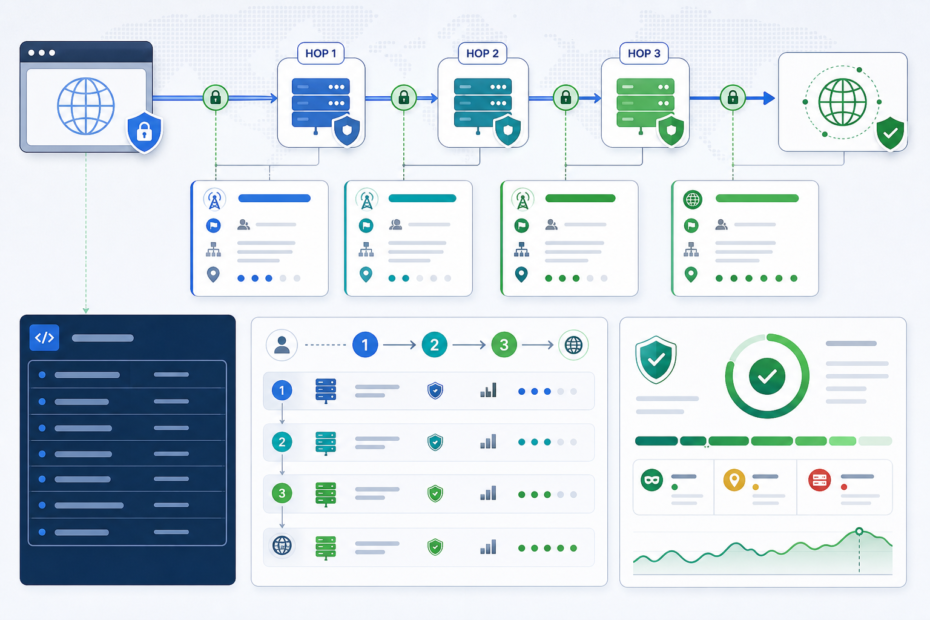

Changing your IP address is not the same thing as becoming invisible. A website can still conclude that your traffic looks proxy-like even when the request is no longer coming from your home connection. That is the answer most users actually need, because “the proxy works” and “the website cannot tell” are two different outcomes.
If you want a quick outside-in check, a tool like What’s My Proxy is useful because it shows how a public service may classify the current network path. For the supporting mechanics, two authority references matter more than most roundups: MDN’s page on X-Forwarded-For and MDN’s page on Via. Those pages explain why some requests still expose forwarding context and why sites have to treat parts of the chain carefully.
The direct answer
A website can still know you are using a proxy because detection is not based on one signal. The site may see forwarding headers, a network that belongs to a hosting provider or known VPN range, a Tor exit, a suspicious ASN pattern, or a combination of evidence that makes the traffic look unlike an ordinary residential connection. Even if one signal disappears, the others may still be enough to label the request as proxy-like.
That also means the opposite is true: a proxy label does not automatically mean the user is hiding malicious intent. A shared VPN exit, a corporate gateway, a public cloud path, or a recycled IP range can create proxy-like signals for perfectly ordinary traffic. Good systems separate the evidence from the judgment.
What websites actually see first
The first thing a website gets is the network path that delivered the request. If the request comes directly from your home ISP, the site’s logs will usually show that public address. If the request comes through a forward proxy, VPN, Tor exit, reverse proxy, CDN, load balancer, or enterprise gateway, the visible path changes. In some setups the origin server mainly sees the last proxy in the chain. In others it also receives headers that describe earlier hops.
This is where many users get misled. They test a proxy, see that the apparent IP changed, and assume the site can no longer infer anything useful. But the IP change only proves that the traffic is exiting somewhere else. It does not prove that the path looks ordinary, that the headers are clean, or that the exit network resembles a consumer ISP rather than infrastructure commonly used for proxying.
Why headers still matter
MDN describes X-Forwarded-For as a de-facto standard request header used to identify the originating IP address of a client connecting through a proxy chain. That is an immediate clue for why some requests still look proxied. If a forward or reverse chain preserves or adds that context, the server may have more than just the final source IP to work with.
But the important part is not merely that the header exists. MDN also warns that improper use of X-Forwarded-For is a security risk. If the chain is not trusted end to end, the values can be spoofed or malformed. That means a site operator should not blindly trust every leftmost address or every comma-separated hop. A site can still use the header as a clue, but security decisions must be based on a trusted proxy model, not on wishful parsing.
The Via header matters for a different reason. MDN says it is added by forward and reverse proxies to track message forwards and to identify protocol capabilities along the chain. Not every setup will expose it publicly, but when it does appear it is one more signal that the request path was mediated rather than direct. In short, headers can leak context even when the final public IP looks otherwise unremarkable.
Why headers alone are not enough
Headers are only one layer. Many modern anti-abuse or access systems also look at network ownership. The current guide at How proxy detection works explains the problem in more practical terms: proxy detection compares network identity, routing, infrastructure lists, risk signals, and evidence confidence. That is closer to how many real systems think.
If an IP belongs to a datacenter ASN, a well-known VPN provider, a Tor exit, a cloud host, or an infrastructure network that rarely behaves like normal residential browsing, the site may classify the request as proxy-like even if there are no obvious forwarding headers. That is why a “clean” request from a server IP can still be recognized as non-residential traffic. The path is not identified as a proxy because of a magical proxy flag in the packet. It is identified because the network itself carries a recognizable operational profile.
Why a residential-looking IP still may not save you
The reverse mistake also happens. Users sometimes assume that a residential-looking IP guarantees stealth. It does not. A residential address can still appear suspicious if the behavior, routing, rate, or surrounding evidence do not match a normal user session. Shared gateways, mobile carrier NAT, rapidly rotating sessions, conflicting ASN or route data, or repeated abuse history can still change how the traffic is interpreted.
What’s My Proxy’s own guidance is useful here because it makes a point many users skip: the result is a network estimate, not a statement about a person. That is the right mental model. A detector is inferring what kind of path the request likely came through. It is not proving identity, motivation, or legitimacy on its own.
What the labels usually mean
The old proxy vocabulary of transparent, anonymous, and elite is still useful, but it is too small for modern traffic analysis. Transparent generally means the path leaks the real client address or explicit forwarding context. Anonymous usually means the direct client IP is hidden but the path still looks mediated. Elite or high-anonymity usually means fewer obvious proxy-specific leaks at the HTTP layer.
That vocabulary is still helpful for a quick mental model, but it does not capture the full detection problem. A request can behave like an elite proxy at the header level and still look like datacenter infrastructure from the ASN. It can avoid a Via header and still come from a known Tor exit. It can suppress a simple proxy header and still inherit risk from the route, service role, or repeated network behavior. The labels are useful shorthand, not the whole verdict.
Where false positives come from
False positives are not edge trivia. They are operationally important. A shared VPN exit, a corporate office gateway, public Wi-Fi behind a managed egress, a mobile carrier path, a public resolver range, or a recycled cloud block can all create signals that look proxy-adjacent. That does not mean the user is doing anything wrong.
This is where confidence matters. The What’s My Proxy detection guide says confidence should travel with the verdict, and that is the right pattern. A low-confidence datacenter hint is not the same as a high-confidence Tor exit classification. A weak signal should usually raise review, logging, or step-up friction. It should not automatically collapse into a ban or a hard accusation.
For operators, this is the difference between a useful trust system and a blunt one. Severity and confidence are separate ideas. A signal can be high confidence but low consequence in your workflow. It can also be medium confidence but still important enough to combine with other evidence before you decide what to do.
How to debug your own proxy setup
If your real question is “why does the site still know I’m on a proxy?”, debug it in layers. First, confirm what the outside world sees using a public checker like What’s My Proxy. That tells you how a third-party network-path tool currently classifies the exit. Second, inspect whether your software or stack is leaking forwarding headers, especially if you are chaining proxies, reverse proxies, or custom middleware. Third, look at the network identity of the exit IP itself. If the address belongs to a datacenter or a well-known privacy service, a site may still classify it as proxy-like even with clean request formatting.
Also separate “proxy is visible” from “proxy is unusable.” A site may know the traffic is proxy-like and still allow it. Another site may know and simply apply extra checks. Another may block by policy because the workflow is high risk. Visibility does not automatically equal failure. It only tells you what signal surface you are dealing with.
How operators should use the signal responsibly
Site operators should treat proxy detection as routing evidence, not moral evidence. If you see a datacenter route plus high-risk abuse history plus a bad signup pattern, you may justify stricter rate limits or manual review. If you only see a weak proxy hint on a low-risk page, a softer response is more coherent. The safest pattern is to show the classification, the evidence, the confidence, and the action it triggered.
MDN’s warning on X-Forwarded-For matters here too. If your trust model around forwarded headers is wrong, you can punish the wrong clients or let abusers spoof around your logic. In other words, proxy detection errors do not only hurt users. They can also make an anti-abuse stack less reliable.
The practical rule to remember
A changed IP only answers one question: did the request exit from somewhere else? It does not answer the harder questions: does the path leak forwarding context, does the exit network look like proxy infrastructure, how strong is the evidence, and how cautious should the site be about false positives? Those are the questions that actually decide whether a website still “knows” you are using a proxy.
If you keep that frame in mind, a lot of confusion disappears. Public proxy tests are useful. Header docs are useful. ASN and route context are useful. But none of them, alone, is the whole story. The real answer is multi-layered because the signal surface is multi-layered.
Bottom line
Websites still know you use a proxy because they are not only looking at the final IP. They may see leaked forwarding headers, proxy-added hop information, a datacenter or VPN-style ASN, Tor exit evidence, or a broader risk pattern tied to the exit network. The best way to interpret the result is to separate what the network path suggests from what it proves about a user. That gives end users a better debugging method and gives operators a more defensible enforcement model.
