
Are you struggling to consistently publish fresh, relevant content to keep your audience engaged? Do you wish there was an easier way to discover and share high-quality content your visitors will love? If so, content curation could be the solution you‘re looking for.
In this in-depth guide, you‘ll learn everything you need to know to automatically curate compelling content for your WordPress website. We‘ll cover what content curation is, key benefits, best practices, top WordPress curation plugins, and how to measure success. By the end, you‘ll be ready to put content curation to work to grow your traffic and audience engagement.
What is Content Curation?
Content curation is the process of discovering, organizing, and sharing the most relevant, highest quality content on a specific topic for your target audience. Rather than creating all new content from scratch, you strategically select and share valuable third-party content, adding your own unique commentary and perspective.
When done well, content curation allows you to provide your audience with a hand-picked selection of the best content to meet their needs and interests. According to a Curata study, 85% of marketers say content curation is an important part of their strategy, and over 50% say it improves customer engagement, web traffic, and leads.
Some key characteristics of effective content curation include:
- Focusing on quality over quantity
- Providing excerpts of curated content, not full reproductions
- Always attributing and linking to the original source
- Adding your own insights and opinions to add value
- Organizing content by theme or topic for easy navigation
Benefits of Curating Content in WordPress
So why should you consider curating content on your WordPress site? When done strategically, content curation can deliver significant benefits, such as:
Saving time on content creation. Finding and sharing quality third-party content takes less time than creating all original content yourself.
Providing a more diverse content mix. Curating content from a variety of expert sources provides your audience with diverse insights and ideas.
Establishing thought leadership. Curating content from authoritative sources and adding your own analysis positions you as a go-to expert in your niche.
Boosting SEO and traffic. Curated content with summaries and commentary can attract search traffic and social shares, driving more visitors to your site.
Engaging your audience. Hand-picking the most relevant, valuable content keeps your audience coming back and engaging with your brand.
In fact, according to data from Scoop.it:
- Websites with curated content get up to 8x more traffic than those with just original content
- 60% of marketers share curated content on social media at least weekly
- Curated content pages get 50% more page views and 40% more shares than other pages
WordPress Content Curation Best Practices
To get maximum results from content curation, it‘s important to follow best practices:
Be Highly Selective
Resist the urge to share every halfway decent piece of content you find just to publish something. Be very selective and only curate the best, most valuable content for your specific audience. Focus on authoritative sources and always put quality first.
Curate From Diverse Sources
Don‘t rely too heavily on one source for curated content. Aim to curate from a variety of experts and thought leaders in your industry. Diverse insights make your curated content more valuable.
Always Attribute and Link to the Original
Curated content should drive traffic to the original source, not "steal" it. Proper attribution is a must. Include the author‘s name, the original title, and a direct link to the full piece. Consider reaching out to let authors know you‘re sharing their content.
Add Your Own Insights
Avoid simply reposting excerpts verbatim. Put your own spin on curated content by adding your unique commentary and opinions. Explain why the content matters to your audience. Your insights differentiate your curated content from others who share the same piece.
Use Curation to Supplement Original Content
Curation should enhance your content strategy, not replace content creation entirely. Aim for a healthy balance of original and curated content. Experts suggest curated content should make up 25-50% of your content mix.
Organize curated content so people can easily find topics of interest. Consider categories like:
- Industry news
- How-to guides
- Opinion pieces
- Infographics
- Videos
You could create dedicated topic pages or feeds to make navigation intuitive.
Top WordPress Plugins for Content Curation
WordPress offers powerful plugins to help you automatically curate content from RSS feeds and social media. Here are some of the best options to streamline your curation process:
1. Feedzy RSS Feeds
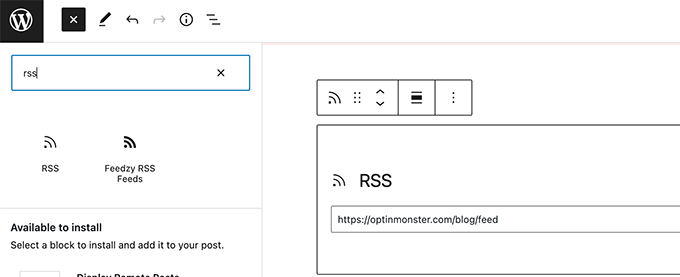
Feedzy RSS Feeds is a popular free plugin to curate content from unlimited RSS feeds. Key features:
- Import full or partial posts from feeds
- Assign posts to categories
- Customize display with templates
- Add featured images from feeds
- Automatically delete old feed items
Upgrading to Feedzy Pro ($99/year) adds advanced features like keyword filtering, adding feeds from specific URLs, and detailed analytics reports.
2. WP RSS Aggregator

WP RSS Aggregator is another powerful tool to curate RSS content in WordPress. Core features include:
- Import unlimited RSS feeds
- Display full or partial content
- Customizable feed templates
- Automatically import images
- Set post status, format & category
Several premium add-ons offer additional capabilities:
- Limit items stored per feed
- Filter feeds by keywords or tags
- Save feed items as WordPress posts
- Display feeds in a widget or shortcode
Plans range from $59-$189/year depending on the add-ons you need.
3. MyCurator

MyCurator is a curation plugin that works with both RSS feeds and social media content. It allows you to:
- Train the plugin to suggest relevant content
- Review and edit suggested content
- Publish selected content to WordPress
- Promote curated posts to social media
- Monetize curated content with ads
MyCurator offers a free version with basic features and premium plans from $10-$100/month for more advanced functionality.
4. Revive Old Posts

While not a traditional curation plugin, Revive Old Posts allows you to get more mileage from your curated content. It will automatically:
- Share curated posts on social media
- Use unique hashtags for each network
- Include images and shortened URLs
- Exclude certain posts or categories
- Set sharing frequency and time slots
This keeps your curated content working for you long after it‘s published, driving social engagement and traffic. The pro version starts at $75/year.
Measuring Content Curation Success
To gauge the effectiveness of your curation efforts, track key performance indicators (KPIs) such as:
- Page views & unique visitors
- Time on page & bounce rate
- Social media shares & clickthroughs
- Newsletter signups
- Leads or sales generated
Use tools like Google Analytics to monitor these metrics and generate reports:

Look for curated posts that get above average engagement and conversion rates. Those topics resonate with your audience and similar content will likely perform well.
Frequently review your content curation analytics and use insights to continually optimize your strategy and provide maximum value to your audience. With consistent effort, you‘ll be well on your way to growing a loyal following through curated content.
