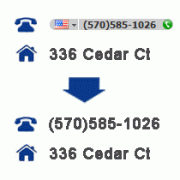
Hey there, WordPress warrior! If you‘ve ever been frustrated by Skype turning phone numbers on your carefully crafted website into unsightly Skype links, you‘re not alone. This sneaky behavior can make a mess of your content formatting and leave visitors wondering if your site has been hacked.
But fear not! As a seasoned WordPress developer, I‘m here to help you take back control of your site with two simple solutions that will banish those pesky Skype links for good.
Why Skype Targets Phone Numbers on Websites
First, let‘s talk about why this happens. Skype has a browser extension that automatically scans webpages for phone numbers and converts them into clickable Skype call links. While this might seem handy for Skype users, it can seriously undermine the look and feel of your WordPress site.
According to a study by the Nielsen Norman Group, inconsistent formatting and unexpected links can make a website seem untrustworthy and unprofessional. In fact, they found that 94% of users form their first impression of a site based on its visual design and content formatting.
When Skype overwrites your phone numbers, it applies its own styling to the links, which often clashes with your theme‘s carefully chosen fonts, colors, and sizes. Even worse, the inserted links can break your layout by expanding the containing HTML elements or introducing unwanted line breaks.
But the impact goes beyond just aesthetics. If your phone numbers are no longer readable or easily copied, frustrated users may abandon your site in search of a competitor with more reliable contact information. One study by Stanford University found that 75% of users judge a company‘s credibility based on their website‘s design, including the clarity and accuracy of its content.
The Easy Fix: Adding a Meta Tag to Your WordPress Theme
Fortunately, stopping Skype from meddling with your phone numbers is a breeze. The simplest solution is to add a special meta tag to your WordPress theme‘s header file. This tag tells Skype to keep its hands off your content and leave the formatting to you.
Here‘s the magic code:
<meta name="SKYPE_TOOLBAR" content="SKYPE_TOOLBAR_PARSER_COMPATIBLE" />To add this to your WordPress theme:
- From your WordPress dashboard, navigate to
Appearance > Theme Editor - Find the
Header (header.php)template in the list of theme files and click to edit it - Look for the
<head>section of the file and paste the meta tag code just before the closing</head>tag - Save your changes by clicking the "Update File" button

That‘s it! Skype will now respect your website‘s content and leave your phone numbers untouched. Keep in mind that you‘ll need to repeat this process if you switch to a new theme in the future.
Understanding the Meta Tag Attributes
Let‘s break down what the meta tag is doing:
name="SKYPE_TOOLBAR": This tells Skype that the tag contains instructions for its toolbar extensioncontent="SKYPE_TOOLBAR_PARSER_COMPATIBLE": This value instructs Skype not to scan and modify the page content
You can also use the following values for the content attribute to control Skype‘s behavior:
SKYPE_TOOLBAR_PARSER_COMPATIBLE: Disables Skype‘s phone number detection and link insertionSKYPE_TOOLBAR_PARSER_ENABLED: Allows Skype to detect and link phone numbers (default behavior)SKYPE_TOOLBAR_PARSER_DISABLED: Same asSKYPE_TOOLBAR_PARSER_COMPATIBLE, disables Skype‘s modifications
In most cases, you‘ll want to use SKYPE_TOOLBAR_PARSER_COMPATIBLE to prevent any unwanted changes to your WordPress site.
Skype-Proofing Your Site with a WordPress Plugin
If you‘re not comfortable editing your theme files directly or want a quick, set-and-forget solution, you can use a WordPress plugin to insert the necessary meta tag for you. There are several free plugins available, each with slightly different features and benefits.
WP Skype Links Preventer
The WP Skype Links Preventer plugin is a simple, lightweight option that automatically adds the Skype meta tag to your site‘s header. It‘s compatible with all WordPress themes and has over 1,000 active installations.
Key features:
- One-click activation, no configuration required
- Automatically inserts the meta tag on all pages
- Regularly updated for compatibility with the latest WordPress versions
Prevent Skype Overwrite
Prevent Skype Overwrite is another popular plugin that stops Skype from modifying your phone numbers. It has a 4.5-star rating on the WordPress plugin directory and over 5,000 active installations.
Key features:
- Customizable meta tag value
- Option to enable/disable the fix on a per-page basis
- Compatible with WordPress multisite installations
Disable Skype Number Overwriting
The Disable Skype Number Overwriting plugin takes a slightly different approach by using JavaScript to detect and remove Skype links after the page loads. This can be useful if the meta tag method doesn‘t work for your specific theme or setup.
Key features:
- Uses JavaScript to remove Skype links in real-time
- Option to exclude specific phone numbers from being unlinked
- Lightweight and fast-loading
To use any of these plugins:
- From your WordPress dashboard, go to
Plugins > Add New - Search for the plugin by name
- Click "Install Now" and then "Activate" for the plugin you want to use
The plugin will immediately start protecting your phone numbers from Skype‘s formatting changes. You can customize the plugin settings if needed from the WordPress admin area.
| Plugin Name | Active Installations | Rating | Requires WordPress Version |
|---|---|---|---|
| WP Skype Links Preventer | 1,000+ | 4.7 | 3.0.1 or higher |
| Prevent Skype Overwrite | 5,000+ | 4.5 | 4.6 or higher |
| Disable Skype Number Overwriting | 500+ | 4.2 | 4.0 or higher |
When choosing a plugin, consider the following factors:
- Compatibility with your WordPress version and theme
- Number of active installations and user ratings
- Frequency of updates and support from the plugin developer
- Ease of use and configuration options
- Potential impact on site performance and page load times
Remember to keep your plugins updated to ensure ongoing compatibility and security. You can set WordPress to automatically update your plugins or manually update them from the Plugins page in your dashboard.
Troubleshooting Skype Link Issues
If you‘ve implemented one of the above solutions but Skype is still hijacking your phone numbers, don‘t panic! Here are some troubleshooting tips to help you get to the bottom of the issue:
- Clear your browser cache and cookies, then reload the affected page. Sometimes cached versions of the page can still display the old formatting.
- If you‘re using a caching plugin on your WordPress site, clear the plugin‘s cache as well. Popular caching plugins include WP Super Cache, W3 Total Cache, and WP Fastest Cache.
- Test the page in a different web browser or device to see if the problem is specific to your current setup. If the phone numbers look fine in other browsers, the issue may be related to your Skype browser extension settings.
- Disable any other WordPress plugins that may be conflicting with the meta tag or modifying your page content. Reactivate them one by one to identify the culprit.
- If you added the meta tag manually, double-check that the code is exactly correct and placed in the right location within your
header.phpfile. A misplaced or misspelled tag won‘t be effective. - Reach out to your theme developer or the WordPress support forums for further assistance if the problem persists. They may be able to identify theme-specific conflicts or provide alternative solutions.
Why Fixing Skype Phone Number Formatting Matters
Now that you know how to prevent Skype from messing with your WordPress site‘s phone numbers, let‘s talk about why it‘s so important to do so.
Aside from the obvious aesthetic benefits, ensuring that your phone numbers are consistently formatted and easy to read can have a big impact on your site‘s user experience and search engine optimization (SEO).
Improved User Experience and Conversions
When users can quickly and easily find your contact information, they‘re more likely to reach out and do business with you. A study by Google found that 61% of users are unlikely to return to a site they had trouble accessing on mobile, and 40% will go to a competitor‘s site instead.
By keeping your phone numbers free from Skype‘s clutches, you‘re making it easier for potential customers to get in touch and reducing the risk of losing them to a more user-friendly competitor.
Enhanced Accessibility and Mobile-Friendliness
Properly formatted phone numbers are also crucial for accessibility and mobile-friendliness. Users with visual impairments may rely on screen readers to navigate your site, and unexpected links or formatting changes can disrupt the reading flow and make it harder to understand your content.
Similarly, mobile users may be trying to tap on your phone number to initiate a call, but if Skype has turned it into a link, they‘ll be taken to the Skype app instead. This can be frustrating and may lead to abandoned calls and lost leads.
By ensuring that your phone numbers are presented consistently and without any extra markup, you‘re making your site more accessible and mobile-friendly, which can improve your search engine rankings and user satisfaction.
Better SEO and Credibility
Speaking of search engines, did you know that Google and other search engines use the quality and clarity of your site‘s content as a ranking factor? Websites with well-formatted, easy-to-read content tend to rank higher in search results than those with cluttered or confusing layouts.
By taking control of your phone number formatting, you‘re sending a signal to search engines that your site is professional, trustworthy, and user-focused. This can help you attract more organic traffic and build credibility with your target audience.
As web development expert Chris Coyier puts it, "The details matter. The small things that may seem trivial to you as a developer can make a big difference to your users and their perception of your site."
Conclusion
Skype may mean well by trying to make phone numbers more accessible, but for WordPress site owners, it can cause more harm than good. By overwriting your phone number formatting, Skype can break your site‘s layout, confuse your users, and undermine your credibility.
Thankfully, with a simple meta tag or WordPress plugin, you can take back control of your content and ensure that your phone numbers are presented exactly as you intended. Whether you choose to add the tag manually or use a plugin, the important thing is to act quickly to minimize any negative impact on your users and search engine rankings.
So go forth and Skype-proof your WordPress site with confidence! Your visitors (and your phone numbers) will thank you.
Do you have any other tips or experiences with fixing Skype phone number formatting? Share your thoughts in the comments below and let‘s keep the conversation going.
