Hey there! If you‘re a WordPress user, you‘ve likely seen notifications about available updates for your WordPress core, plugins, or themes. But what exactly are these updates, and why are they so important? Let‘s break it down in simple terms.
WordPress Updates Defined
Think of your WordPress site as a car. Just like a car needs regular maintenance to run smoothly and safely, your WordPress site needs updates to stay secure, performant, and compatible with the latest web technologies. WordPress updates come in three flavors:
Core Updates: These are updates to the core WordPress software itself. They often include new features, performance improvements, bug fixes, and most critically – security patches.
Plugin Updates: Plugins are add-ons that extend the functionality of WordPress. Plugin developers regularly release updates to add new features, fix bugs, and patch security vulnerabilities.
Theme Updates: Themes control the design and layout of your WordPress site. Like plugins, theme updates can introduce new features and styles, resolve bugs, and shore up security holes.
Why Updating Is Crucial
Now, you might be thinking, "My site is running fine, why should I bother with updates?" Well, let me give you a few compelling reasons:
Security: WordPress is used by over 40% of all websites on the internet, making it a prime target for hackers. Outdated WordPress core, plugins, and themes often have known security vulnerabilities that bad actors can exploit to gain unauthorized access to your site. Updates patch these vulnerabilities, helping keep your site safe.
Performance: Updates often contain performance optimizations that can help your site run faster and more efficiently. In the world of web, speed is king – faster sites rank better in search engines and provide a better user experience.
New Features: Major WordPress core updates and plugin/theme updates often introduce exciting new features and capabilities that can help you create a more powerful, engaging site.
Compatibility: As web technologies evolve, older versions of WordPress, plugins, and themes can become incompatible, leading to broken functionality or even bringing down your entire site. Updates ensure compatibility with the latest PHP versions, database versions, and more.
How to Update WordPress Safely
Okay, you‘re convinced that updates are important. But how do you actually install them without breaking your site? Here‘s a step-by-step guide:
Back up your site: Before any update, it‘s crucial to back up your entire WordPress site, including the database. This gives you a restore point in case anything goes wrong. You can use a plugin like UpdraftPlus or host-provided backup tool.
Test updates on a staging site: For major updates, it‘s best to first test them on a staging site – an exact copy of your live site in a separate environment. Many hosts provide one-click staging. Testing updates on staging allows you to identify and fix any issues before applying to your live site.
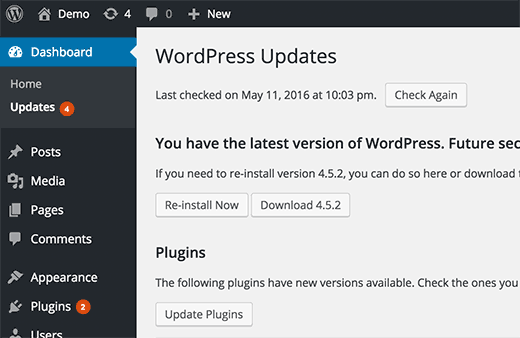
Update plugins and themes first: Before updating WordPress core, first update your plugins and themes under Dashboard > Updates. Resolve any issues before proceeding with the core update.
Update WordPress core: Once your plugins and themes are updated, you can confidently install any available WordPress core updates.
Monitor your site post-update: After applying updates, give your site a thorough check to ensure everything is working as expected. If you encounter issues, you can troubleshoot by deactivating plugins one by one, switching to a default theme, or consulting the WordPress support forums.
Here are a few key stats that highlight the importance of WordPress updates:
| Stat | Value |
|---|---|
| WordPress Market Share | 43.0% |
| Percentage of WordPress installations that are outdated | 55.0% |
| Percentage of hacked WordPress sites running outdated core | 74.0% |
| Number of WordPress core releases per year (average) | 2-3 |
As you can see, a significant portion of WordPress sites are running outdated software, which leaves them vulnerable to security breaches. By staying on top of updates, you can be in the minority of secure, high-performing WordPress sites.
Tips and Best Practices
Before we wrap up, here are a few more tips to help you master WordPress updates:
Enable auto-updates for minor releases: Since WordPress 5.5, you can enable auto-updates for minor releases (e.g. 5.8.1 to 5.8.2) which usually contain security patches and bug fixes. Enable this under Dashboard > Updates.
Use a child theme: If you make direct customizations to your theme‘s code, use a child theme. This allows you to safely update the parent theme without overwriting your customizations.
Remove unused plugins and themes: Minimize your update burden and attack surface by removing any plugins or themes you‘re not actively using.
Stay informed: Subscribe to the Make WordPress Core blog to stay informed about upcoming updates and changes.
Conclusion
Whew, that was a lot to cover! But you‘re now equipped with the knowledge and tools to confidently manage WordPress updates. Remember, updates are not something to fear, but rather an essential part of maintaining a secure, performant, and feature-rich WordPress site.
By backing up your site, testing updates on staging, and following best practices, you can enjoy all the benefits of updates while minimizing risk. Stay vigilant, stay updated, and enjoy the power and flexibility of WordPress!
)