Hello there! If you‘re looking to level up your WordPress skills and engage your audience more effectively, you‘ve come to the right place. Today, we‘re diving deep into the world of WordPress excerpts – those tantalizing teasers that can make or break your reader‘s decision to click through to your content.
As a WordPress developer and content strategist, I‘ve seen firsthand how optimizing your excerpts can dramatically boost your site‘s traffic, engagement, and search rankings. In fact, a study by Orbit Media found that excerpts are the 3rd most important factor in getting your content shared on social media.
So, what exactly are excerpts, and why do they matter so much? Let‘s break it down.
What is an Excerpt in WordPress?
In simple terms, a WordPress excerpt is a brief summary or preview of a post that appears on your homepage, archives, search results, and other list pages. Typically around 55-100 words, an excerpt gives readers a taste of your content and encourages them to click through to read the full post.
You can think of excerpts like movie trailers – their job is to entice the audience and leave them wanting more. A well-crafted excerpt provides just enough information to pique interest without giving away the whole story.
Key Benefits of Using Excerpts
So why bother with excerpts at all? Can‘t you just let WordPress display the first few lines of your post automatically? Well, you could – but you‘d be missing out on some major benefits:
Improved User Experience: Excerpts make your blog index and archive pages more scannable and user-friendly. Readers can quickly browse excerpts to find posts that interest them, without being overwhelmed by lengthy content blocks.
Increased Engagement: Compelling excerpts act as "teasers" that entice readers to click through and explore more of your content. This can boost your pageviews, reduce bounce rates, and encourage visitors to spend more time on your site.
Better SEO: Excerpts provide a natural opportunity to include relevant keywords and summarize your post‘s main topic. This helps search engines understand and rank your content more effectively. Plus, well-written excerpts can increase click-through rates from search results pages.
More Social Shares: When users share your content on social media, the excerpt is often used as the default description. A strong excerpt can make your post more eye-catching and shareable, driving more traffic back to your site.
How to Add Excerpts in WordPress
Now that you understand why excerpts are so powerful, let‘s look at how to harness them on your own WordPress site.
Enabling Excerpts in Posts and Pages
By default, WordPress generates automated excerpts by pulling the first 55 words of your post. However, you can also write your own custom excerpts to better control what appears on your list pages.
To enable the Excerpt field:
- Open a post or page for editing in the WordPress backend.
- Look for the Screen Options tab in the top right corner, and click to expand it.
- Check the box next to "Excerpt" to enable the field.
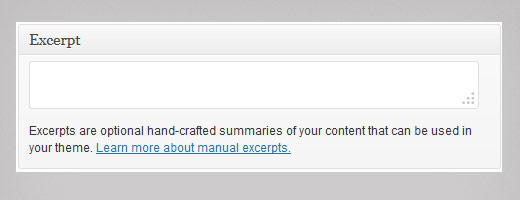
- The Excerpt box will now appear below your post editor, allowing you to enter your custom summary.
Here‘s an example of what the Excerpt field looks like in the post editor screen:
| Title         |
| ------------- |
| Post Content  |
| ------------- |
| Excerpt:      |
| [            ]|
| ------------- |
Different Types of WordPress Excerpts
WordPress provides a few different ways to create excerpts for your posts:
Manual Excerpts: As described above, this involves writing your own custom excerpt in the designated field. Manual excerpts give you full control over what displays, but can be time-consuming if you have a lot of posts.
Automatic Excerpts: If you don‘t specify a manual excerpt, WordPress will automatically generate one by pulling the first 55 words from your post content. You can customize the length of automatic excerpts by adding this code to your theme‘s functions.php file:
function custom_excerpt_length( $length ) {
    return 40; // Change 40 to your desired word count
}
add_filter( ‘excerpt_length‘, ‘custom_excerpt_length‘, 999 );- More Tag Excerpts: When you insert the
<!--more-->tag into your post content, WordPress will use everything before the tag as the excerpt. This allows you to include an excerpt within the post content itself, with more control over the break point.
Excerpt Settings and Plugins
In addition to the built-in WordPress functions, there are a few other ways to customize your excerpts:
Some themes provide excerpt-related settings in the Theme Customizer or options panel. Look for options to control excerpt length, "Read More" link text, or even enable/disable excerpts on specific post types.
Popular SEO plugins like Yoast SEO and All in One SEO Pack include excerpt optimization features. For example, Yoast SEO lets you specify a custom excerpt to use for your search result snippets and social media shares.
Dedicated excerpt plugins can provide even more advanced customization options. Some top-rated excerpt plugins include:
- Advanced Excerpt: Lets you control excerpt length, punctuation, formatting, and more.
- Manual Excerpts: Adds a simple metabox to your post editor for creating custom excerpts.
- Excerpt Plus: Provides options to include/exclude specific HTML tags, customize "Read More" text, and more.
Writing Effective Excerpts: Tips and Best Practices
Now that you know the technical side of excerpts, let‘s talk about crafting them for maximum impact. As an experienced WordPress consultant, here are my top tips for writing excerpts that engage and convert:
Keep it concise: Aim for around 2-3 sentences or 55-100 words. You want to provide a teaser, not a full summary.
Hook readers with strong language: Use action verbs, vivid adjectives, and compelling statements to grab attention. Lead with a question, quote, or surprising fact.
Focus on benefits and emotions: Instead of just describing your post topic, emphasize how it will help or impact the reader. Evoke curiosity, excitement, or urgency.
Optimize for search and social: Include 1-2 relevant keywords for SEO, but avoid obvious stuffing. Craft excerpts that work well as standalone social media posts or search snippets.
Customize the "Read More" link: Generic "Read More" links can feel stale. Try action-oriented phrases like "Learn the strategy," "See the full tutorial," or "Get the free download."
Use formatting for clarity: Break up long excerpts with…
...Continue reading ->
By putting these tips into practice consistently, you‘ll start to see measurable improvements in your click-through rates, time on site, and even search rankings.
Conclusion and Next Steps
Phew, that was a lot to cover! But congratulations – you‘re now equipped with a solid understanding of WordPress excerpts and how to leverage them for your site‘s success.
To recap, excerpts are short teasers that summarize your post content, engage readers, and boost your visibility in search and social media. You can add excerpts manually, automatically, or using the More tag, and customize them with built-in settings, themes, and plugins.
Most importantly, focus on writing concise, compelling excerpts that hook readers with strong language, benefits, and a clear call-to-action. The more you practice and test different approaches, the more you‘ll home in on an excerpt strategy that works for your unique audience and goals.
For more expert tips and tutorials, be sure to bookmark WPBeginner as your go-to WordPress resource. You‘ve got this!
Now, I‘d love to hear from you: What‘s one key takeaway or action step you‘ll implement from this guide? Let me know in the comments below!
